English




Optical Fiber Inspection Instruction
Many field technicians and network maintenance staff ask: Why do fiber end face failures happen? What tools are needed for fiber inspection? What are the standard inspection steps for connectors and optical modules? How to avoid cross-contamination? This full guide covers pollution types, professional tools, standard operating procedures, safety rules and troubleshooting tips for fiber end face inspection.
Optical connectors are common throughout the network and give us the power to add, drop, move and change the network. However, it is an undeniable fact that the end face pollution of optical connectors is a major cause of the failure of the network.
Ⅰ. What Are Common Fiber End Face Pollution & Pollution Sources?
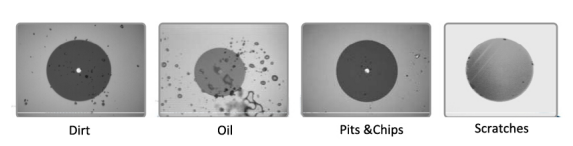
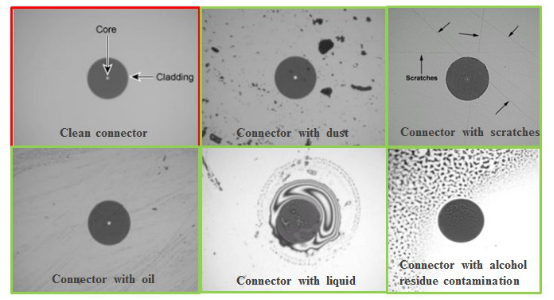
Like picture 1, the end face of the optical fiber or connector shall be no pollution or defect. Common pollution and defect types include dust, dirt, pits and debris as well as scratches(Picture 2). Besides the above issues, typical defects also include oil stains, alcohol residue, liquid marks and coating peeling. All these problems will lead to increased insertion loss, high bit error rate and unstable network transmission.
In addition, there are many different pollution sources, such as testing equipment, dust cap, bulkhead, people and environment, etc. Once the device is contaminated, there will be cross contamination between the network connector and the port. Thus, inspecting and cleaning test ports and leads before testing network connectors prevents cross-contamination. Daily cross-contamination scenarios: Reused dust caps, unclean adapter bulkheads, bare fiber exposed to dusty environment, fingerprints left by manual operation. It is recommended to perform inspection before every fiber mating or equipment access.

Picture 1. End surface free of any contamination or defects
Mandatory inspection scenarios:
New fiber patch cords, modules and equipment before deployment
After long-term storage or outdoor use of fiber links
Network troubleshooting for signal loss or bit errors
After disassembly, relocation and re-wiring of fiber links
Regular daily maintenance of data center and communication room
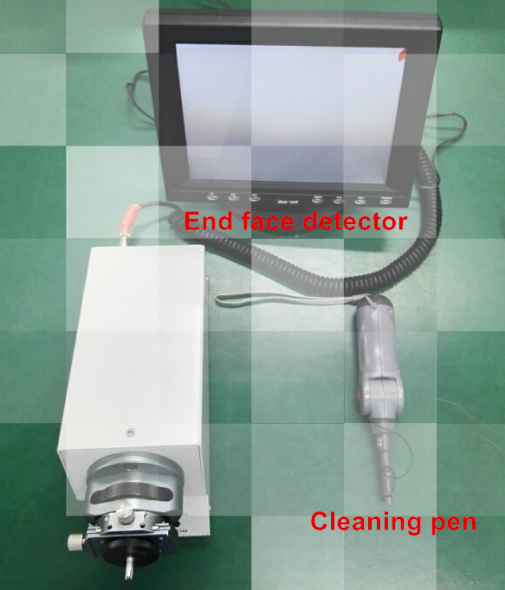
Ⅲ. What Tools Are Required for Optical Fiber Inspection?
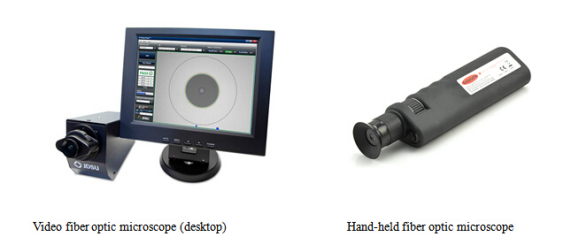
Supplementary essential tools for inspection & cleaning:
1) Optical power meter: Confirm no laser output before inspection for safety
2) Fiber cleaning pen/one-click cleaner: For dry cleaning of end faces
3) Lint-free wipes & high-purity alcohol: For stubborn oil and residue
4) Laser safety goggles: Protect eyes from invisible infrared laser
5) Anti-static box: Store dust caps and small accessories separately
Ⅳ. Standard Inspection Steps for Optical Fiber Connectors
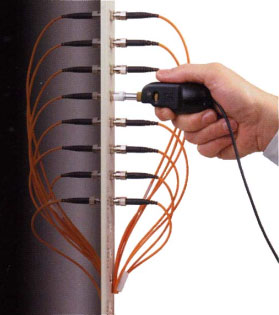
※ Or, place the tip of the hand-held probe into the bulkhead connector and adjust the focus as picture 5.
※ On the video monitor, verify that there is no contamination present on the connector end face. Here you can see the sample images of contamination conditions in picture 6.
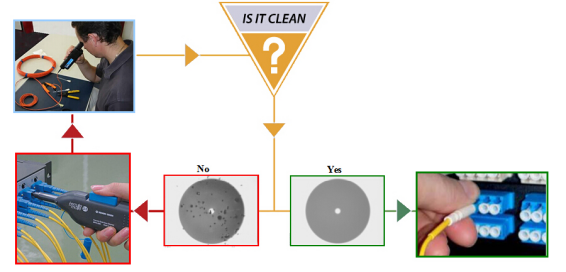
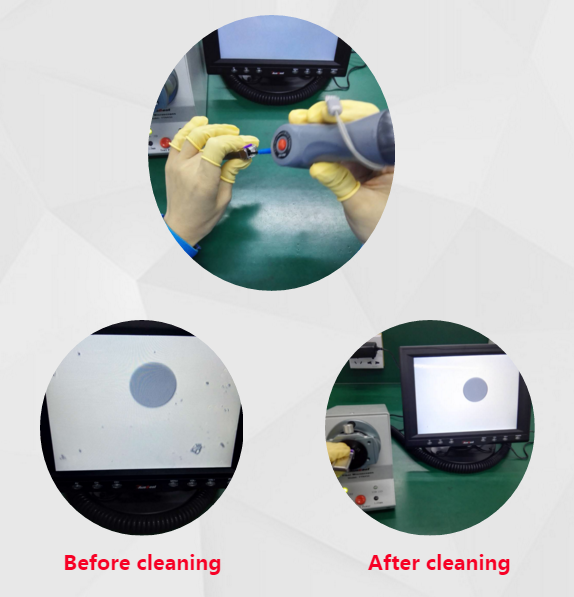
※ If the end face is not clean, clean the end face and reinspect. If clean, immediately plug the dust cap, to reduce the risk of recontamination.
Optical module port maintenance notes:
1) SFP/QSFP/MPO high-speed modules have more precise end faces, stricter cleanliness requirements
2) Use a dedicated small-size cleaning pen for LC/SC module ports
3) Do not use excessive alcohol to prevent liquid from penetrating into the module interior
4) Keep dust caps installed when modules are not in use for a long time
Ⅵ. Daily Maintenance Suggestions
Optical fiber connector is an important component of fiber optic network, but they must be handled properly. In order to ensure the fiber connection work with high performance, it is necessary to keep fiber and connectors end face clean. This can be easily achieved with active inspection and cleaning. For inspection, we must use the proper inspection tools and strictly observe the each steps of inspection.
Daily maintenance suggestions:
1) Establish regular inspection cycles for data centers and computer rooms
2) Equip each maintenance team with standard inspection and cleaning tools
3) Standardize operation specifications to avoid manual pollution
4) Replace aging dust caps and adapters regularly
ETU-LINK strictly implements end face inspection and cleaning procedures for all optical transceivers and fiber patch cords before delivery, ensuring each product meets industrial cleanliness standards and provides stable transmission performance for your network.
Last updated: June 15, 2026
Previous :
Sharing of fixed optical attenuatorNext :
How to use fast connectors?Categories
New Blog
Tags
For inquiries about our products or pricelist, please leave your information with us and we will be in touch with in 24 hours.


 13th Floor, Building 6, Honghualing Base, Nanshan Intelligent Manufacturing Base, Liuxian Avenue, Taoyuan Street, Xili, Nanshan District, Shenzhen, China
© Copyright: 2026 ETU-Link Technology CO ., LTD All Rights Reserved.

IPv6 network supported
Friendly Links:
易天官网